

AWS SAP MCP Server vs. Custom MCP Server
What if your procurement team could type “I need Castor Oil” into a chat window, and a Purchase Requisition got created in SAP S/4HANA automatically? That is exactly what we built at YASH Technologies.
The Problem with SAP + AI
SAP S/4HANA holds critical enterprise data: materials, suppliers, purchase orders, inventory. But connecting AI agents directly to SAP is painful. OData V2 has its own grammar, CSRF tokens expire, and SSL certificates need careful handling. Model Context Protocol (MCP) solves this by giving AI agents a standard interface to call tools that wrap SAP OData APIs under the hood.
We built a procurement chatbot using Amazon Bedrock AgentCore, Strands Agents framework, and Amazon Nova Pro as the LLM. It handles multi-item carts, SAP-live material search, plant and supplier selection, and Purchase Requisition creation – all from a single chat window.
We evaluated two integration approaches:
- Approach 1: AWS SAP MCP Server – AWS’s official integration layer, deployed via CloudFormation on Bedrock AgentCore
- Approach 2: Custom MCP Server – a Python-based MCP server built in-house, deployed inside the same AgentCore runtime
SAP Modules Integrated (MM & MM-PUR)
This POC covers SAP MM (Materials Management) and MM-PUR (Purchasing) on SAP ECC/S4HANA.
| SAP Module | OData Service | Key Entity Set | Purpose |
| MM | MMIM_MATERIAL_DATA_SRV | I_InvtryMgmtSuplrInfoRecdVH | Material search; all plant-supplier combinations |
| MM-PUR | API_PURCHASEREQ_PROCESS_SRV | A_PurchaseRequisition | Create Purchase Requisition with full line items |
| MM-PUR | API_PURCHASEREQ_PROCESS_SRV | A_PurchaseRequisitionItem | Fetch PR line items for duplicate check |
| MM-IM | API_MATERIAL_STOCK_SRV | A_MatlStkInAcctMod | Real-time inventory check by material and plant |
| FI-CO | API_COSTCENTER_SRV | A_CostCenter | Cost centre validation before PR creation |
| MM-BP | API_BUSINESS_PARTNER | A_BusinessPartner | Vendor/supplier master data lookup |
APPROACH 1 │ AWS SAP MCP Server
What It Is
AWS for SAP publishes an official MCP Server deployed on Amazon Bedrock AgentCore via a pre-built CloudFormation template. It exposes three generic tools — odata_read, odata_write, and odata_create — which the agent uses to call any SAP OData service by name. No custom integration code needed; AWS maintains the integration layer.
Architecture
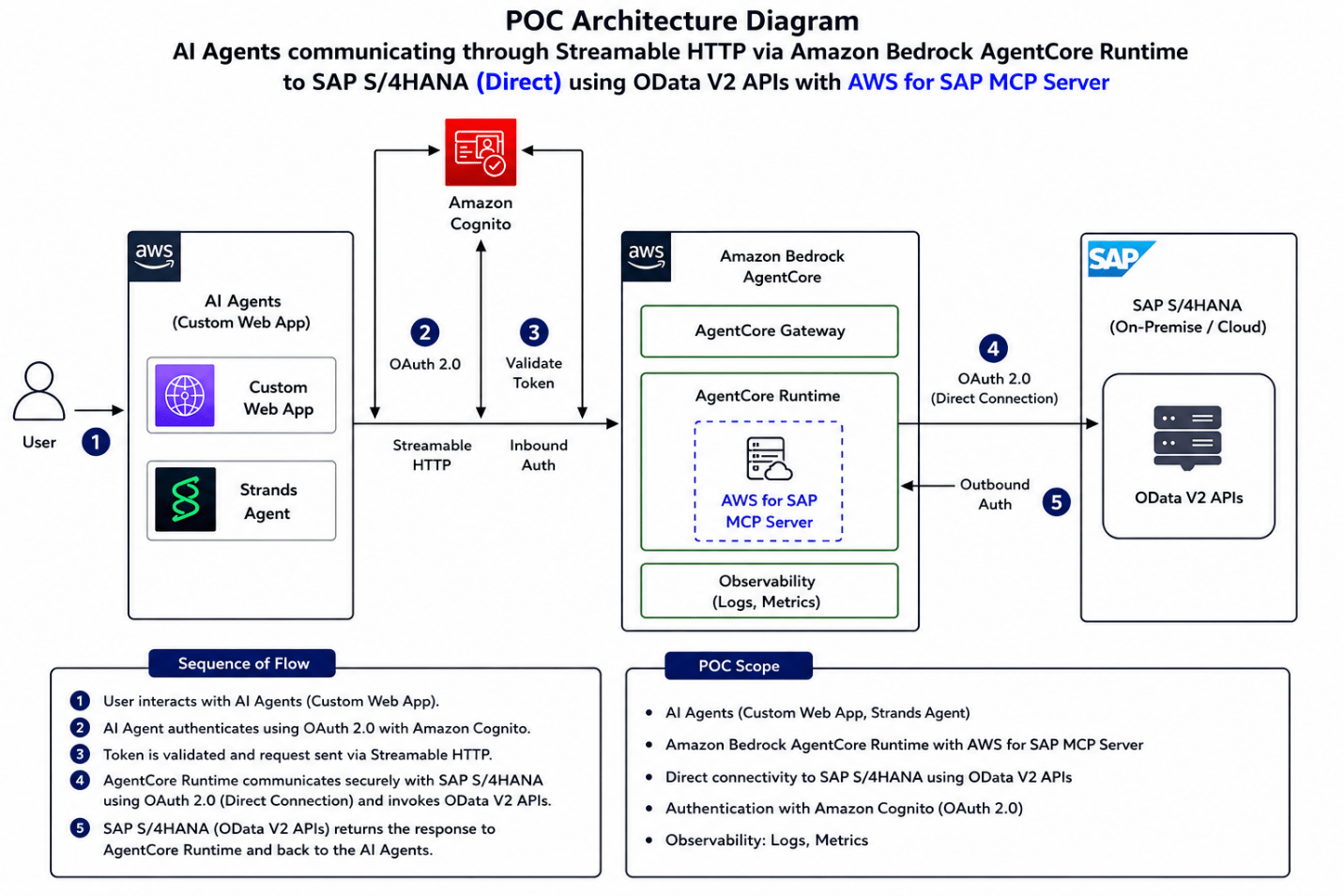
User → Custom Web App → Amazon Cognito (OAuth 2.0 M2M) → Bedrock AgentCore Runtime (Streamable HTTP) → SAP S/4HANA (OData V2)
| AWS SAP MCP Server — 5-Step Flow |
| Step 1: User sends request via Custom Web App (Streamlit/React) |
| Step 2: AI Agent authenticates using OAuth 2.0 with Amazon Cognito (M2M client credentials flow) |
| Step 3: Token validated; request forwarded via Streamable HTTP to AgentCore Runtime |
| Step 4: AgentCore Runtime invokes SAP S/4HANA using OAuth 2.0 outbound auth and OData V2 APIs |
| Step 5: SAP returns response through AgentCore back to the AI Agent |
Technical Setup
| Setup Step | What It Does |
| SAP Connectivity Test | Direct OData endpoint test before AWS deployment — confirms SAP reachability from network |
| AWS Secrets Manager | SAP credentials (username, password) stored securely, injected at runtime |
| VPC Network Setup | AgentCore Runtime microVMs have no public IP — requires private subnet + NAT Gateway for outbound access |
| CloudFormation Stack | Single template deploys entire stack: runtime, IAM roles, VPC config, Cognito, logging |
| Amazon Cognito | M2M client credentials flow — supports Entra ID and Okta as enterprise identity providers |
Real Challenges – Documented with AWS Support
| # | Challenge | Root Cause (AWS Confirmed) | Resolution |
| 1 | VPC: Runtime initialisation timeout (120s), CloudWatch showing 0 bytes | AgentCore microVMs get NO public IP. Default public subnet had zero outbound path to ECR, Secrets Manager, Cognito, CloudWatch, or SAP | Created private subnet + NAT Gateway in public subnet with route 0.0.0.0/0. Redeployed CloudFormation with new private subnet ID |
| 2 | SSL/TLS Handshake Failure despite direct curl working | SAP Gateway served only leaf certificate. Container’s default trust store could not verify incomplete chain (openssl s_client showed 1 cert) | Stripped private key from bundle.pem, kept only CA certificate chain, uploaded to Secrets Manager. Alternatively: fix SAP ICM to serve full Sectigo chain |
| 3 | odata_read returning fewer records vs. direct SAP OData call | AWS SAP MCP Server hard-caps odata_read at 100 records per request — no config override. LLM may also add $select autonomously, causing missing fields | Switched to Custom MCP Server with sap_get_all() pagination ($top + $skip). For AWS path: use $filter with substringof(); configure Service Hints S3 file to block agent-added $select |
APPROACH 2 │ Custom MCP Server
What It Is
We built our own MCP Server from scratch in Python using FastMCP, deployed inside the same Amazon Bedrock AgentCore runtime. Every tool is hand-crafted: stem-aware material search, paginated SAP data fetching, plant-supplier filtering, and intelligent date parsing. The 100-record cap does not apply — sap_get_all() paginates automatically across all SAP records.
Architecture
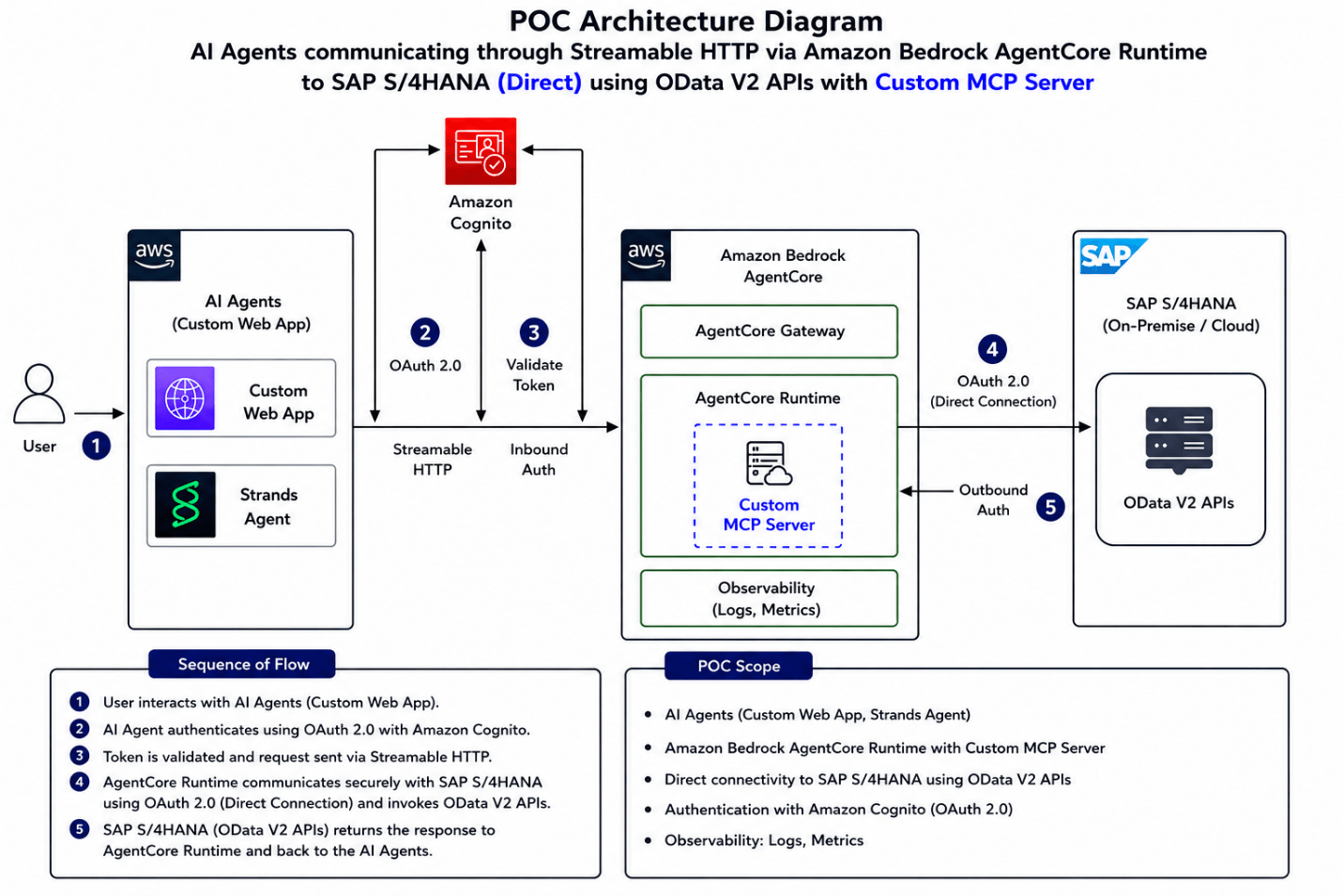
Same five-step OAuth + Streamable HTTP flow as Approach 1. The difference is inside AgentCore: instead of the AWS-managed layer, the AgentCore Runtime executes your own Python MCP Server, packaged via agentcore deploy using ARM64 CodeBuild containers.
| Custom MCP Server — 5-Step Flow (same OAuth + Streamable HTTP path) |
| Step 1: User sends request via Custom Web App |
| Step 2: AI Agent authenticates using OAuth 2.0 with Amazon Cognito |
| Step 3: Request forwarded via Streamable HTTP to AgentCore Runtime |
| Step 4: AgentCore Runtime runs Custom Python MCP Server → calls SAP OData V2 APIs directly |
| Step 5: SAP returns response; Custom MCP Server returns structured tool result to AI Agent |
Intelligence Built Into the Tools
- Stem-aware material search: ‘coils’ matches ‘Full coils’, ‘COIL 2*2’ — SAP filter uses OR logic with original query and stemmed form
- Word-boundary matching: ‘oil’ does NOT match ‘coil’ — prevents false positives that plain substringof() cannot catch
- Full pagination (no cap): sap_get_all() loops with $top + $skip, fetches all records automatically
- Self-contained button payloads: plant and supplier codes embedded directly in payloads, not array indices (handles AgentCore multi-instance behaviour)
- Intelligent date clarification: ‘next month’ triggers clarifying question with actual month name; ‘this week’ warns if only days remain
- Secrets Manager fallback: config.py tries .env first (local dev), then Secrets Manager automatically (AgentCore) — same code, both environments
Agent Conversation Flow
| Step | What Happens |
| Material Search | User: “I need Castor Oil” → agent calls search_material() → SAP MM returns all plant-supplier combos from MMIM_MATERIAL_DATA_SRV |
| Qty + Date | Agent asks for quantity and delivery date; handles ‘next month’, ‘this week’ intelligently with clarifying questions |
| Cost Centre / WBS | Agent validates account assignment before adding to cart |
| Multi-Item Cart | User adds multiple line items, each with own material, plant, supplier, quantity, and delivery date |
| PR Creation | On confirm: create_purchase_requisition() posts PR to SAP via API_PURCHASEREQ_PROCESS_SRV. PR number returned and displayed |
Head-to-Head Comparison
| Factor | AWS SAP MCP Server | Custom MCP Server |
| Setup time | ~15 min via CloudFormation | 3–4 days (Python + testing) |
| Records per request | Hard cap: 100 per odata_read call | No cap – sap_get_all() paginates fully |
| Tool intelligence | Generic odata_read / write / create | Custom filtering, scoring, pagination, NLP |
| Customisation | None – black-box AWS layer | Full – add any logic to any tool |
| Authentication | Cognito M2M + Secrets Manager (automated) | Secrets Manager (.env fallback, manual) |
| Cost model | Always-on AgentCore Runtime | Pay-per-invoke only |
| Observability | CloudWatch + X-Ray (auto-configured) | CloudWatch + X-Ray (auto-configured) |
| Maintenance | AWS maintains it | You own the code |
| Best for | Fast enterprise deployment, standard APIs | Custom logic, cost-sensitive, full control |
When to Use Which
Choose AWS SAP MCP Server when:
- You need to go live fast and standard SAP OData APIs cover your use case
- You want AWS to fully manage the integration layer
- Enterprise security (Cognito + Secrets Manager) is a hard requirement
- 100 records per call is sufficient for your data volumes
Choose Custom MCP Server when:
- You need to fetch more than 100 records (pagination without limits)
- You need intelligent filtering, custom scoring, or business logic inside the tool layer
- You want zero vendor lock-in – pure Python, works anywhere
- Cost matters and you want pay-per-invoke, not always-on compute
See it in Action
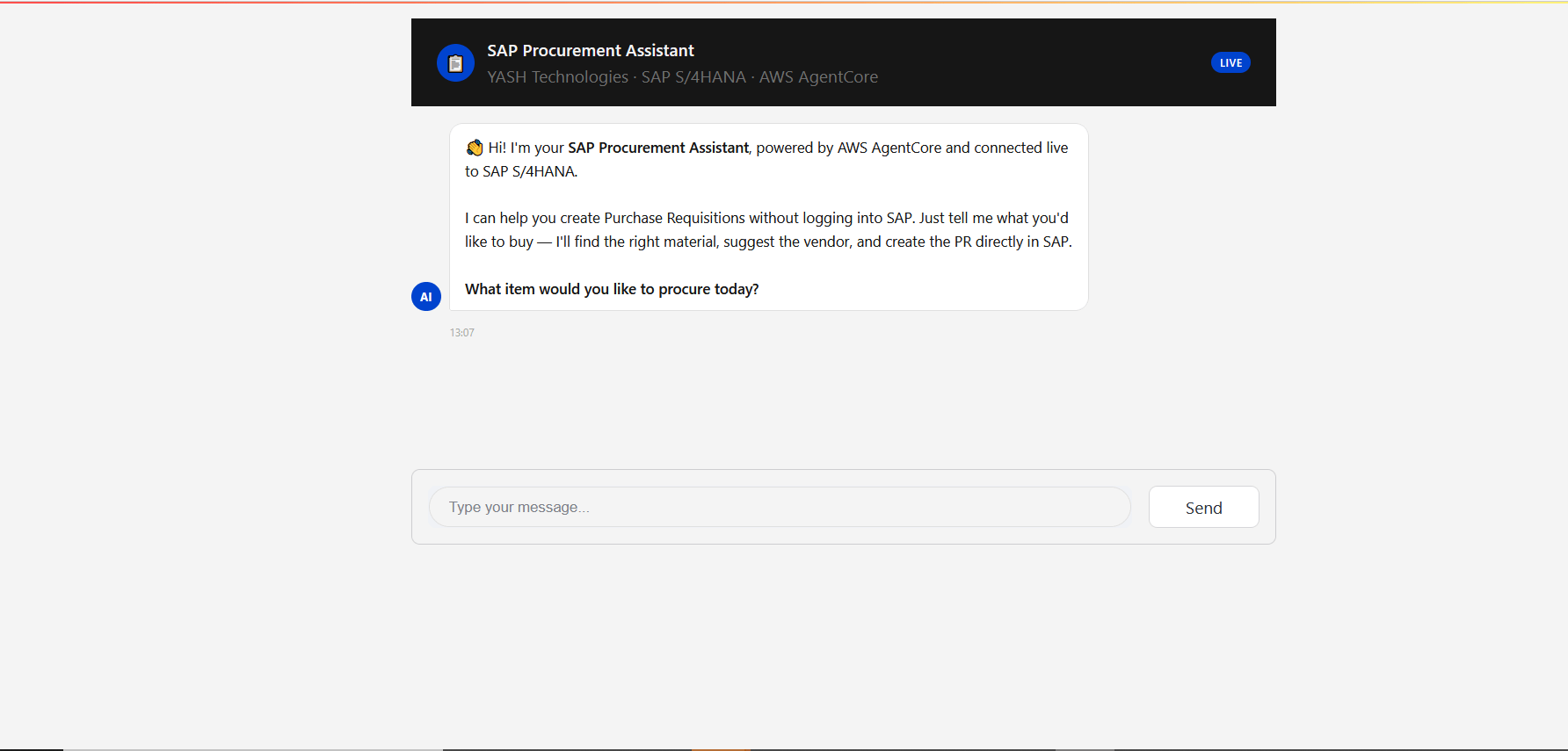
A user opens the Streamlit chat UI and types a single sentence:
“I need oil “
- Material search: Agent calls search_material(‘oil’) – SAP MM returns material code XXXX across all plant-supplier combinations from MMIM_MATERIAL_DATA_SRV
- Live selection: A dropdown is rendered with all SAP-sourced plant and supplier options – no hardcoding, real data
- Date intelligence: ‘End of June’ is parsed to 2026-06-30. ‘End of month’ would prompt: ‘End of May is May 31 – only 3 days away. Did you mean end of next month?’
- Cost centre: Agent asks for MM-PUR cost centre or WBS code before finalising the line item
- Review and confirm: Full PR summary shown – material, quantity, unit, supplier, plant, delivery date. User clicks Confirm
- SAP write: Agent calls create_purchase_requisition() — PR created in SAP S/4HANA via API_PURCHASEREQ_PROCESS_SRV (MM-PUR). PR number returned and displayed
From Chat to SAP: End-to-End Demo
Lessons Learned the Hard Way
- AgentCore needs a private subnet + NAT Gateway: microVMs get no public IP. Deploy in public subnet and nothing starts — CloudWatch shows 0 bytes with no error.
- SSL certificate chain must be complete: SAP Gateway must serve root + intermediate + leaf. Verify with openssl s_client -showcerts before deploying.
- AWS SAP MCP Server has a hard 100-record cap: use $filter with substringof() for targeted queries, or switch to Custom MCP Server for bulk access.
- The LLM may autonomously add $select: the AI agent can restrict which SAP fields are returned. Check CloudWatch Logs to inspect the actual OData URL constructed.
- AgentCore multi-instance behaviour: never rely on in-memory state for user selections – embed plant codes and supplier IDs directly in button payloads.
- Date ambiguity is a real UX problem: ‘next month’ and ‘this week’ are too vague for a PR system. The agent must clarify with the actual date before accepting input.
Final Thought
Both approaches work. The AWS SAP MCP Server is the right choice for enterprise-grade infrastructure with minimal code. The Custom MCP Server is the right choice when you need the tool layer to be as intelligent and unrestricted as the agent layer.
What made this POC genuinely hard was not the AI part – Nova Pro + Strands handled the reasoning beautifully. The hard part was the SAP plumbing: incomplete TLS chains, VPC routing gaps, OData pagination limits, and the gap between what a direct API call returns and what the MCP layer passes through. Those are the real lessons worth publishing.
MCP is not just a protocol. For SAP integrations, it is the missing link between enterprise data systems and conversational AI.

Shrina Neema
Associate Data Scientist
I enjoy building and solving problems that come with a certain level of complexity and ambiguity. This blog documents a real SAP + MCP integration journey that involved weeks of troubleshooting, multiple AWS Support discussions, and continuous debugging before the solution worked successfully end to end. I am genuinely passionate about learning not just as a professional skill, but as a mindset. Whenever something does not work as expected, I naturally feel driven to understand the root cause and see it through to completion. That curiosity and persistence are a big part of how I approach problem solving. The SAP + MCP integration covered in this blog reflects that journey well. There was no predefined playbook for the implementation, so the solution evolved step by step while addressing challenges around VPC networking, SSL certificate chains, OData pagination limits, and multi-instance state management. Every challenge along the way contributed to making the final solution more robust and reliable.
More From Author.
Related Posts.




Why Unused SAP Data Costs More Than You Think
Bhavani Sankar Rajasekharuni

How to Carve Out Your SAP System Efficiently Using Archiving
Yellaiah Gattaiah Devasani


Why SAP Archiving Projects Fail Before They Start
Yellaiah Gattaiah Devasani



Predictive Maintenance Is Only as Good as the System Behind It
Firdosh Kotwal Hari Mantravadi