


ECC to S/4HANA Conversion: A Structured Security & Authorization Transformation Framework
Publish Date: October 1, 2026Transitioning from SAP ECC to SAP S/4HANA is rarely just a technical upgrade, it is a comprehensive enterprise transformation that serves as a core pillar for your broader SAP Digital Transformation. It reshapes your architecture, redefines business processes, and completely overhauls the user experience, security models, and governance frameworks.
Yet, while the functional and technical workstreams often get the spotlight, the security and authorization transformation during an SAP ECC to S4HANA Migration are frequently underestimated. As any seasoned architect knows, this is actually one of the highest-risk areas in a system conversion.
When security takes a backseat during SAP S/4HANA Migration planning, the fallout is immediate and severe. A poorly executed security conversion can lead to:
- Business disruptions and a sharp drop in end-user productivity
- Excessive access provisioning as teams scramble to keep operations running
- Unmitigated Segregation of Duties (SoD) risks
- Compliance violations and, ultimately, audit failures
To help you navigate this complex landscape, this blog outlines a structured, field-tested framework. Drawing from real-world project execution, we will walk through the critical phases of managing security, role redesign, SU24/SU25 alignment, Fiori adoption, and overall governance during your SAP ECC Migration journey to S/4HANA.
Phase 1: Conversion Prerequisites
Before any technical execution begins, you have to build a rock-solid foundation. As security architects, we know that skipping these prerequisites almost always leads to rework, system inconsistencies, and governance failures down the line.
1. Lock Down the Conversion Strategy: Clarity is critical here. You need to clearly define and document your overarching conversion approach (whether that is a System Conversion, Landscape Transformation, or a Selective Carve-out). Just as importantly, document your transport, customization, and retrofit strategies, along with how you will handle parallel landscape alignment and role conversion. Putting this on paper ensures your Basis, Security, Functional, and Business teams are all rowing in the same direction.
2. Master the Simplification List: The SAP Simplification List is not just a reference document, it must be actively used as your single source of truth for transaction and functionality impact analysis. You will rely on it to:
- Identify deprecated transactions
- Map out replaced business functions
- Understand the broader functional impacts
- Plan your exact authorization replacements
3. Define the Business UX Strategy: Before building roles, confirm the business’s direction regarding the user experience. Are they adopting a Fiori-first strategy, rolling out Fiori + Mandatory apps, or sticking strictly to Classic SAP GUI? This decision cannot be an afterthought; it directly dictates your role design, authorization concepts, Fiori Catalog strategy, app activation scope, and overall security architecture.
4. Backup Critical Security Tables: Never start a conversion without a baseline. Before any migration activities begin, take a full backup of the following tables. These will act as your safety net for post-upgrade validation, troubleshooting, and audit reconciliation:
| Security & Authorization Tables | USOBT, USOBX, USOBT_C, USOBX_C, USOBT_CD, USOBX_CD, USORG, AGR_1251, AGR_1252, AGR_TIMEB |
| Repository & Menu Tables | TSTC, TOBJ |
| Fiori Content | /UI2/FLPCA, /UI2/FLPCM_CUST |
5. Confirm Basis Readiness: Before you touch a single role or authorization, you need a formal green light from your Basis team. Security execution must never begin before technical readiness is absolute. Obtain explicit confirmation that:
- All base upgrade activities are 100% complete
- All required add-on adjustments have been finalized
- All SPAM/SAINT activities are successfully closed out
- All (SPAU) technical compatibility checks have cleared without issues
Jumping the gun before Basis has stabilized the environment – is a guaranteed recipe for system inconsistencies and duplicated effort.
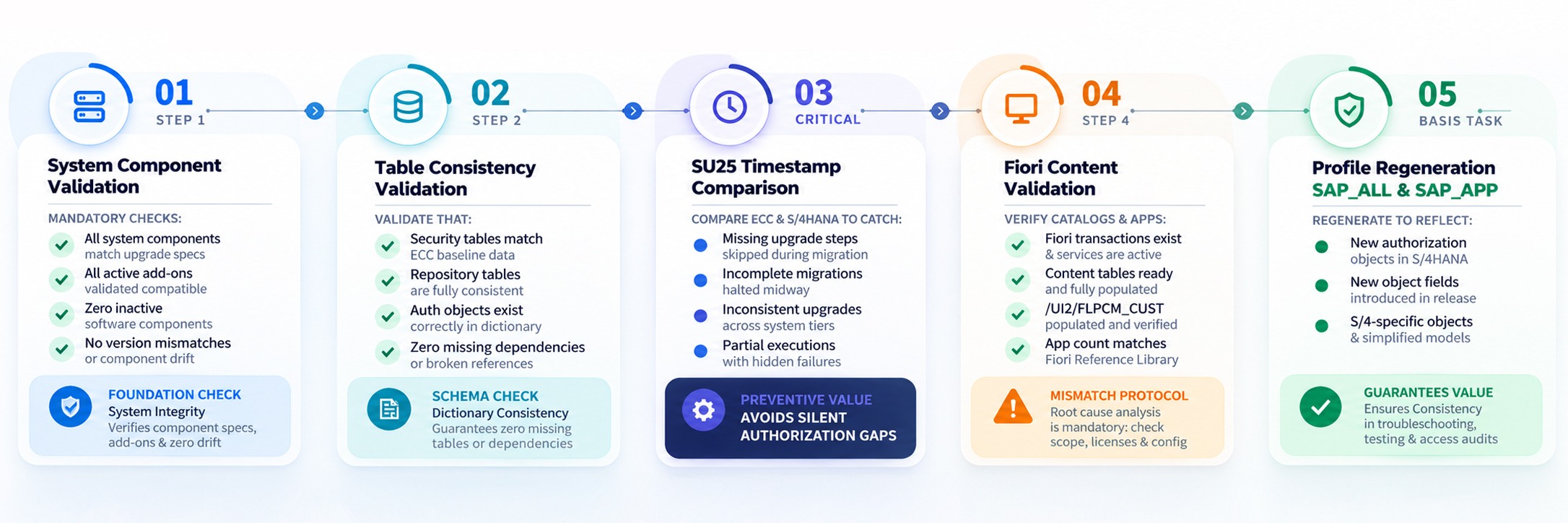
Phase 2: Post-Upgrade Validation (Pre-SU25 Execution)
Before running any SU25 activities, perform the following validations:
Phase 3: SU25 Execution Governance Model
Let’s get one thing straight: SU25 is not merely a technical task, it is a comprehensive security governance activity. Treating it as a simple Basis checklist is a guaranteed path to compliance failures and broken access models.
Here are the non-negotiable best practices and governance frameworks for executing SU25 safely:
1. Documentation & Auditability
Treat every action in SU25 as if it is actively being audited.
- Document every single SU25 step with timestamps
- Download all step results prior to making changes
- Maintain strictly version-controlled records
- Store all outputs in a centralized repository as formal audit evidence
2. Controlled Execution
Architect’s Warning: If any step yields unusually huge data volumes, blank outputs, or unexpected values, pause execution immediately. Do not move forward until you have conducted a root-cause analysis.
3. No Auto-Execution for Critical Steps: Automation is great, but it has no place in the critical decision-making steps of SU25. Never use auto-execution for Step 2C and Step 2D. For these steps, all outputs must be manually downloaded, analysed, formally reviewed, approved, and then manually adjusted.
4. Business Validation Governance: Security cannot operate in a silo during a conversion. SAP’s suggested transaction replacements must pass through a strict business validation loop:
- Business Analysts must validate SAP’s suggestions against real-world usage
- Functional Owners must formally approve transaction replacements
- Process Owners must confirm the broader process impacts
Compliance Teams must review the final mapping for newly introduced risks
5. Role Hygiene Principles: Use the conversion as an opportunity to clean house. When adding replacement transactions, ensure you actually remove the deprecated ones. Avoid granting duplicate functional access, actively design roles to prevent future upgrade conflicts, and explicitly reduce your baseline SoD risk exposure.
6. Authorization Design Principles: Stick strictly to the principle of least privilege. Do not rely on granting wide access by default just to get through testing. Instead, build around progressive enablement, issue-driven adjustments, and test-driven authorization tuning
7. Risk & Compliance Integration: Throughout the SU25 process, you must continuously evaluate the impact on:
-
- Existing SoD risks
- Established control violations, and overall audit compliance
- Firefighter/Emergency Access, as they are given Inconsequential importance
8. Change Management: Finally, remember the human element. S/4HANA conversion changes how people do their jobs, end users must be proactively informed of transaction changes, trained on new access methods, educated on Fiori navigation, and heavily supported through the transition.
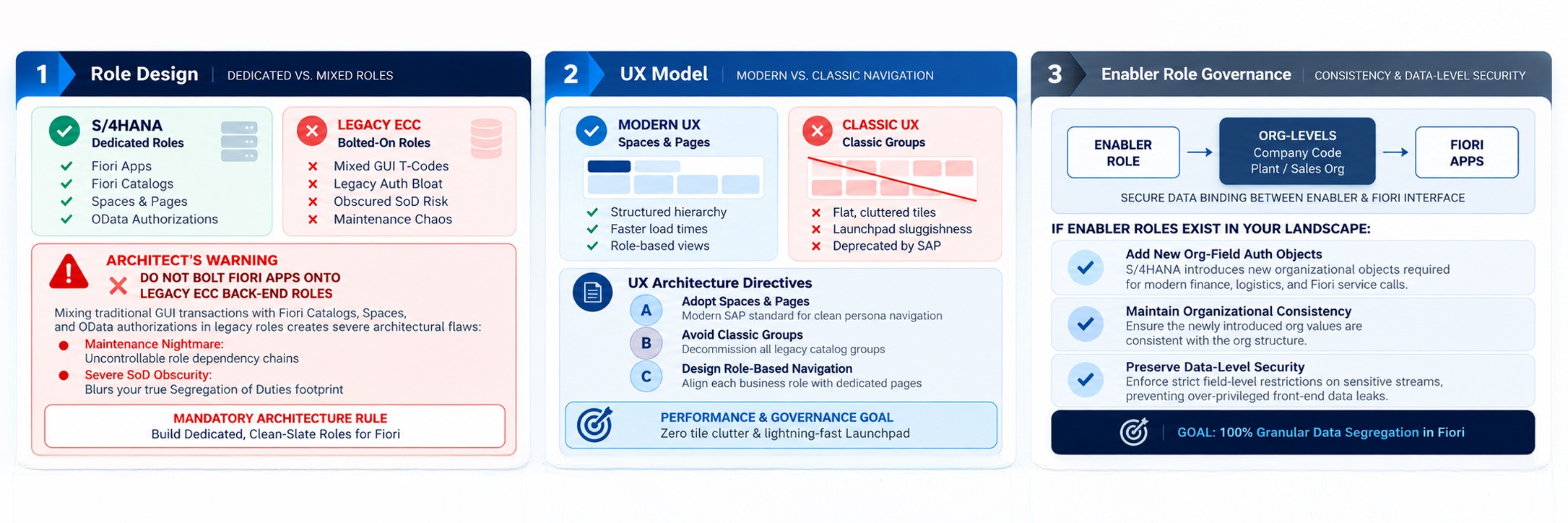
Phase 4: Fiori Security Architecture Strategy
Transitioning to SAP Fiori is arguably the most visible shift for your business users. But beneath that sleek interface, it fundamentally alters your authorization model. Fiori security requires a clean-slate mindset.
Phase 5: Risk Control & Compliance Validation
Revalidate:
- No critical authorizations are introduced
- No wide access exposure
- No control violations
- No audit failures
- No regulatory breaches
Phase 6: Transport Governance
Transport sequencing is critical:
- Share full transport list with Basis
- Maintain strict sequence
- First transport must be SU25 Step 3
- No parallel uncontrolled transports
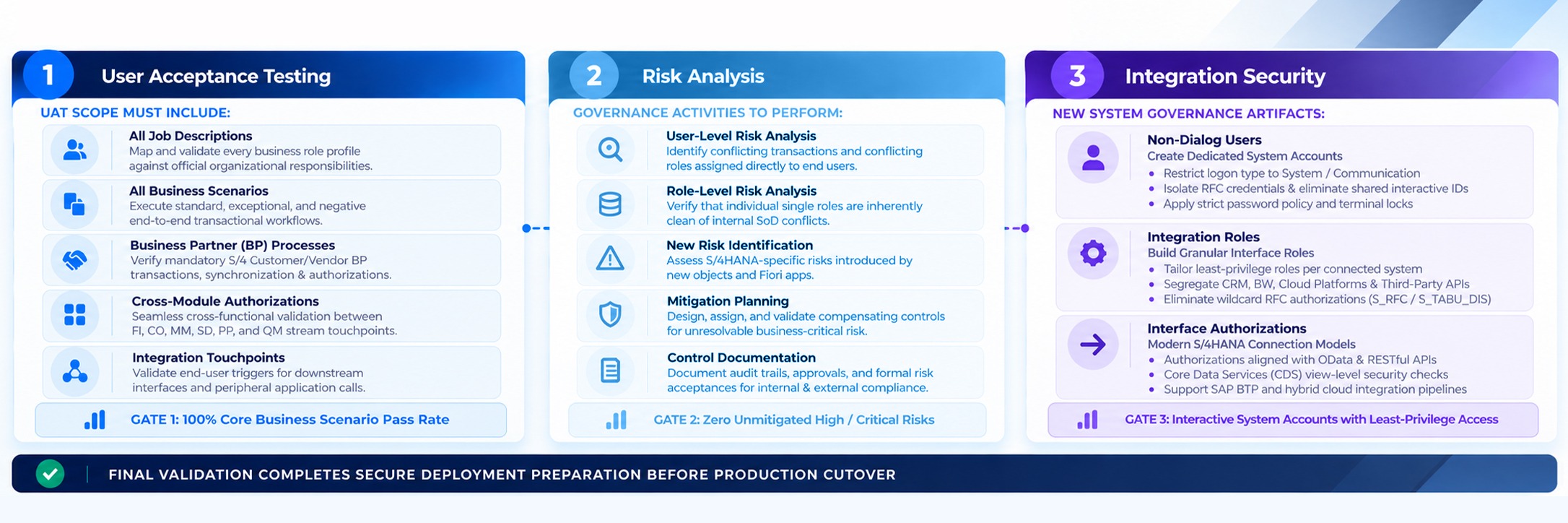
Phase 7: Testing & Validation Framework
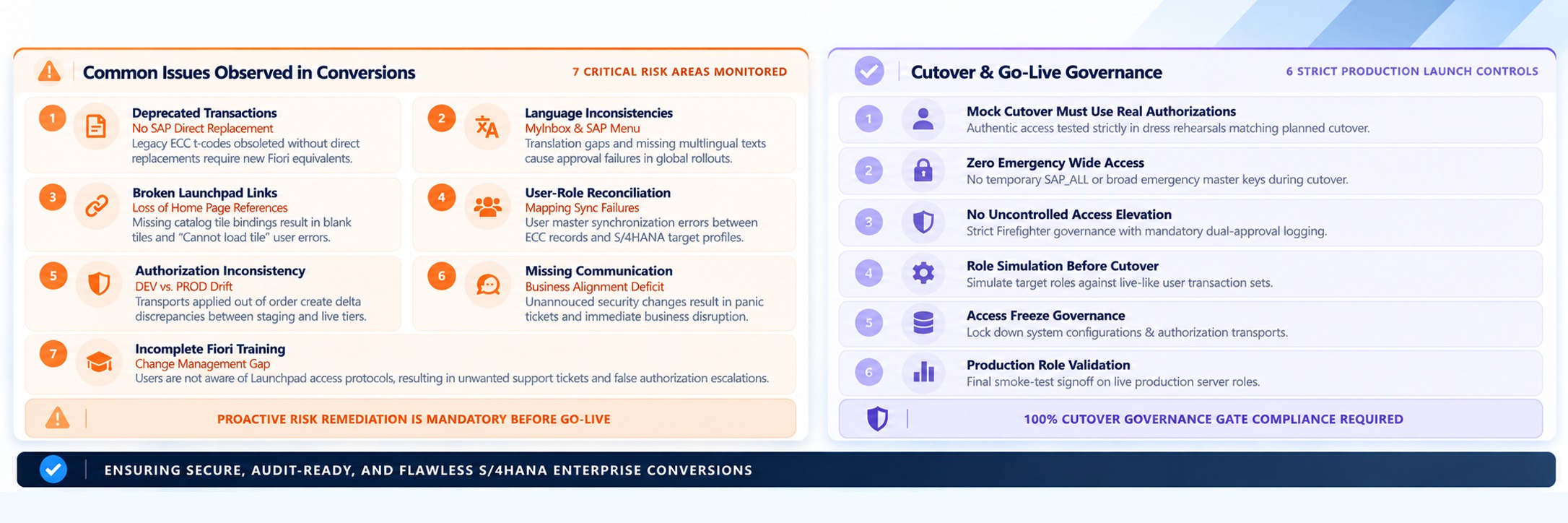
Operational Challenges & Risk Areas

Related Posts.



Why Unused SAP Data Costs More Than You Think
Bhavani Sankar Rajasekharuni

How to Carve Out Your SAP System Efficiently Using Archiving
Yellaiah Gattaiah Devasani


Why SAP Archiving Projects Fail Before They Start
Yellaiah Gattaiah Devasani



Predictive Maintenance Is Only as Good as the System Behind It
Firdosh Kotwal Hari Mantravadi